
AI Reviewer Maker
AI Reviewer Maker: Turn Notes and PDFs into a Reviewer
Upload your lecture notes, handouts, or PDFs, including photos of handwritten notes, and the AI builds a reviewer you can practice with: flashcards for key terms and practice questions with an answer key. Made for the LET, board exams, the civil service exam, and school exams.
Free to start
No credit card
OCR included
How it works?
From a pile of notes to a reviewer you can practice with, in three steps.
Step 1
Upload Your Notes
Drop in a PDF, Word doc, Google Doc, or photos of your notes. Scanned handouts and handwritten notes work because OCR is built in.

Step 2
AI Builds Your Reviewer
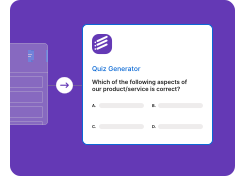
The AI finds the key terms and concepts and turns them into flashcards and practice questions with an answer key. Set the difficulty and edit anything.
Step 3
Review Anywhere
Flip flashcards and answer practice questions on your phone or laptop, print the reviewer with a separate answer key, or share it with classmates.
Three reviewer formats from the same notes
Use one format or combine all three. Each is built from the material you upload.
Key Terms Reviewer
The AI pulls the important terms and concepts out of your notes and writes them as term and definition cards, so the core of the chapter fits on a few pages you can print or scroll through.
• Term and definition pairs
• Taken from your own notes
• Edit any definition
• Printable
• Scanned notes supported (OCR)
Practice Test Reviewer
Practice questions written from your material with a marked answer key, so you can answer first and check after, the way the real exam will test you.
• Multiple choice questions
• Answer key included
• Easy, medium, or hard
• Fresh questions on the same topics
• Print or answer online
Flashcard Reviewer
Question and answer cards and fill-in-the-blank (cloze) cards you can flip and shuffle on your phone during breaks or on the commute.
• Question and answer cards
• Cloze (fill-in-the-blank) cards
• Flip and shuffle
• Study on any device
• Share with classmates
What is a reviewer?
In the Philippines, a reviewer is the study material you use to prepare for an exam. It can be a summary of your notes, a list of key terms, a set of practice questions, or a mix of all three. Students make reviewers for quizzes and periodical exams, and graduates rely on them for the LET, board exams, and the civil service exam. Review centers sell them, classmates share them, and many people still write them out by hand the night before.
Writing a reviewer by hand helps you read the material once. The real benefit comes from testing yourself on it again and again. An AI reviewer maker handles the slow part, turning pages of notes into cards and questions, so more of your time goes into answering, checking, and reviewing what you got wrong.
How to make a reviewer with AI
- Gather your review materials. Collect your lecture notes, handouts, slides saved as PDF, or photos of handwritten notes. Use the exam coverage or table of specifications for your exam to decide which topics to include.
- Upload them to Formswrite. Upload a PDF, Word doc, Google Doc, or images. Scanned pages and photos are read with built-in OCR, so there is no retyping.
- Choose the reviewer format. Pick flashcards for terms and definitions, practice questions with an answer key for exam-style review, or both, and set the difficulty.
- Check and edit. Read through the generated cards and questions. Correct anything that does not match your notes and delete what you already know well.
- Review with active recall. Answer the practice questions without looking at your notes, check the answer key, and regenerate fresh questions on your weak topics a few days later.
Reviewer ideas by exam
- LET (Licensure Examination for Teachers): Split your review by the exam parts, General Education, Professional Education, and your specialization, and make a practice test reviewer for each so you can see which part needs more time.
- Civil Service Exam: Make separate reviewers for verbal ability, numerical ability, analytical ability, and general information topics such as the Philippine Constitution, using your own review notes as the source. Civil service exam reviewer guide.
- LTO driver's license exam: Turn your notes on road signs, traffic rules, and safe driving into flashcards and a multiple choice practice test before your written exam. LTO exam reviewer guide.
- Board exams: Nursing, criminology, engineering, accountancy, and other board exams cover a lot of terminology. Use term cards for definitions and practice tests for application questions.
- School exams: Upload the handouts and slides from the quarter and make a reviewer for your periodical or final exam in one sitting.
Formswrite is not affiliated with the PRC, the Civil Service Commission, or the LTO. Reviewers are generated from the materials you upload and are not official exam questions.
Tips for a reviewer that actually works
- Start from the official exam coverage so you do not spend days on topics that are not tested.
- Make one reviewer per subject area instead of one huge file. It is easier to see your weak spots.
- Answer practice questions before rereading your notes. Getting a question wrong shows you what to study.
- Time yourself on practice tests so exam day pacing feels familiar.
- Come back to the same topics after a few days and regenerate fresh questions so you are not just memorizing answers.
Reviewer maker vs study guide maker
They use the same Formswrite features. This page focuses on exam review in the Philippines. For general study guides for any class, see the AI study guide maker. If you only want cards, use PDF to flashcards, and for a quiz maker from PDF, try PDF to MCQ.
Free vs paid
You can start free with no credit card. Flashcards and the native Formswrite form are on the free plan, which covers reviewing on your own. Paid plans add higher volume and exports to Google Forms and other platforms, which teachers use to assign practice quizzes.
Who uses the AI reviewer maker
For Students and Board Exam Takers
Turn lecture notes, handouts, and review center materials into a reviewer you can actually practice with, instead of rewriting everything by hand.
• LET and board exam review
• Civil service exam practice
• School quizzes and periodical exams
• Works with photos of notes
• Study on your phone
For Teachers and Review Centers
Build a reviewer for a unit or a mock exam from the materials you already use, and share it with your class as a form or a flashcard deck.
• Reviewers from your lesson materials
• Practice quizzes with answer keys
• Share as a Formswrite form
• Google Forms export on paid plans
• Edit before sharing
Stop Rewriting Notes. Start Practicing.
Upload your notes and let the AI build the flashcards and practice questions. Free to start, no credit card.
Free to start
No credit card
OCR included
AI reviewer maker FAQ
What is a reviewer maker?
A reviewer maker turns your study materials into a reviewer, the notes and practice questions students in the Philippines use to prepare for exams. The Formswrite AI reviewer maker reads your notes or PDFs and builds flashcards for key terms and practice questions with an answer key.
Can AI make a reviewer from my PDF or notes?
Yes. Upload a PDF, Word document, Google Doc, or photos of your notes. The AI finds the key terms and concepts and turns them into flashcards and practice questions based on that material. You can edit everything before you study.
Is the AI reviewer maker free?
You can start free with no credit card. Flashcards and the native Formswrite form are included on the free plan. Exporting practice questions to Google Forms or other platforms is part of the paid plans.
Can I use it to review for the LET or a board exam?
Yes, as practice built from your own review materials. Formswrite is not affiliated with the PRC, the Civil Service Commission, or the LTO and does not have official exam questions, so the quality of your reviewer depends on the notes and materials you upload.
Does it work with photos of handwritten notes?
Yes. Formswrite has built-in OCR, so photos of handwritten notes, scanned handouts, and image-based PDFs are read and turned into flashcards and practice questions.
Can I print my reviewer?
Yes. You can print your study kit with the answer key on a separate page, or study online by flipping flashcards and answering the practice questions on your phone or laptop.
Can teachers make reviewers for their students?
Yes. Upload the unit handouts or slides, generate a practice quiz and flashcards, and share them with your class as a Formswrite form or flashcard deck. On a paid plan you can also export the quiz to Google Forms.
More study tools from Formswrite
Turn any document into flashcards, practice questions, or a full mock exam.
AI Study Guide Maker
Flashcards and practice questions from any notes or PDF.
PDF to Flashcards
Turn a PDF into a flashcard deck with built-in OCR.
PDF to MCQ
Pull multiple choice practice questions out of a PDF.
AI Quiz Generator
Make a quiz from any topic, text, or document.
Multiple Choice Test Maker
Build a full mock exam with an answer key.
Reviewer guides
- Civil service exam reviewer - what to cover and how to practice.
- LTO exam reviewer - road signs, traffic rules, and practice questions.
- How to turn notes into flashcards - what belongs on each card.
- How to study with flashcards - active recall and spaced review.
Simple, Transparent Pricing
Start for free. Upgrade anytime.
Yearly
✨ Save 70%
Payment will be processed in USD, EUR, SGD, BRL, JPY, or INR.
Free
Get started free with 5 forms
Free
No credit card required.

5 Formswrite Forms
AI Builder (Fred AI)
10 AI questions per month
Browse Question Bank
Best Value
Pro
Unlimited everything, no limits
$49.99
/yearCancel anytime.
Everything in Free, plus:
Unlimited conversions
All 25+ export formats
Unlimited AI questions
Unlimited AI Lesson Plans
Unlimited AI Rubrics
Unlimited AI Worksheets
Flashcards
Presentation Decks
AI Video Lessons
Audio Lessons
Comics
Podcasts
Formswrite Play (Gamify Quizzes)
YouTube Video to Quiz
Bulk convert
Priority support
Lifetime
Pay once, use forever
$150
one-timeOne-time payment. No recurring fees.
Everything in Pro
Flashcards
Presentation Decks
AI Video Lessons
Audio Lessons
Comics
Podcasts
Formswrite Play (Gamify Quizzes)
YouTube Video to Quiz
One-time payment
Lifetime access to all features
All future updates included
Priority support forever